

4CP Optimization
Automatically curtail your ERCOT site before it contributes to one of the four coincident peaks that set next year's transmission charges.
In ERCOT, a large share of your transmission bill is set by the four highest grid peaks each summer (June through September). If your site keeps hashing through one of those peaks, you pay more for transmission all next year.
4CP Optimization watches ERCOT load in real time and curtails your site before a new monthly peak locks in—so you trade a short amount of downtime for a much lower transmission bill.
Available on Energy → 4CP Optimization, for ERCOT sites only.
What you get
- Automatic curtailment when the grid is close to setting a new peak you can't afford to contribute to.
- Live visibility into how close ERCOT is to a peak, what the engine is doing, and what it already did.
- A clear audit trail so ops can explain every curtailment after the fact.
Automatic curtailment only fires when Intelligent Miner is enabled. Without it, the engine can monitor and signal, but it can't act on your miners for you.
You don't need to stare at ERCOT dashboards all summer. Turn the engine on, pick how conservative you want to be, and let it work.
Before you start
- Your site must be on ERCOT (other ISOs don't use this 4CP mechanism).
- Open Settings, enable the 4CP Optimization Engine, and save.
Until the engine is enabled, the page is read-only monitoring at best—no signals go out.
Using the page day to day
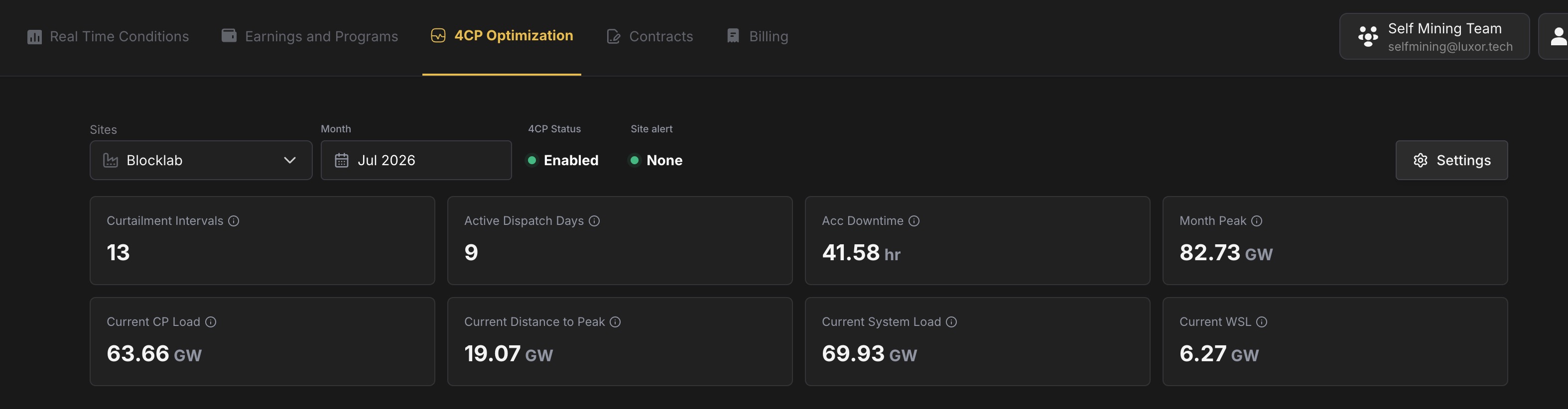
Pick your site and month at the top. Everything on the page follows those two filters.
Status indicators
4CP Status — Is the engine on or off for this site?
Site alert — What the engine wants right now:
- None — All clear. No peak risk worth acting on.
- Curtail — Peak season (Jun–Sep). The engine is telling the site to drop load.
- Sustain — Off-season (Oct–May). Different dispatch mode; still driven by the engine, not your manual ops call.
These reflect what the engine is signaling, not whether every miner has already responded. Check your site if alert and actual load don't match.
KPIs
During peak season, keep an eye on:
- Month Peak — The highest ERCOT coincident peak so far this month. Every new interval that beats this number is bad for next year's transmission bill.
- Current CP Load and Distance to Peak — How close the grid is to beating that peak right now. When distance gets small, curtailments become likely.
- Curtailment Intervals and Acc Downtime — What the engine already cost you this month, in intervals and hours. Use this to judge whether your aggressiveness setting is right.
Historical months are for review. The live row of "current" KPIs only matters for the month you're in.
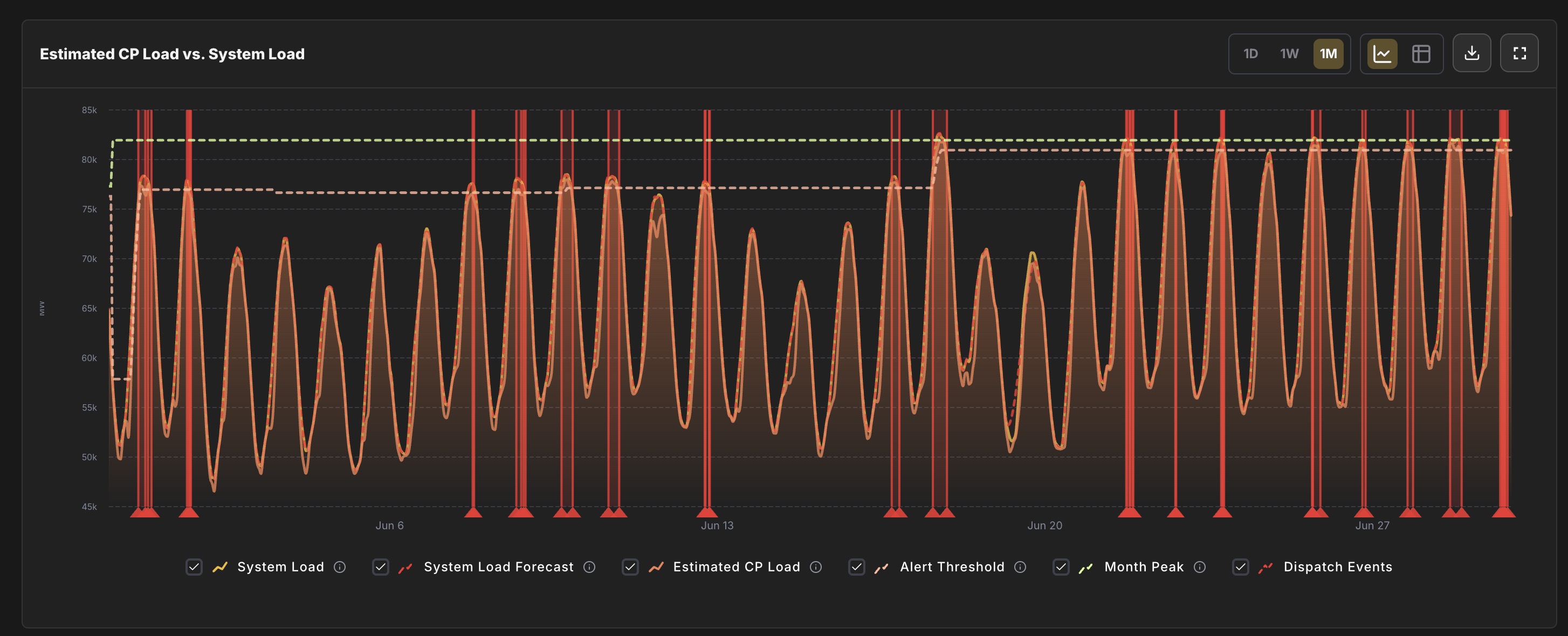
Load chart
This is the main "what's happening on the grid" view. You're comparing:
- Estimated CP Load — The number ERCOT actually uses for 4CP (grid load minus battery charging). This is the line that matters for your bill.
- Month Peak — The high-water mark you're trying not to break.
- Alert Threshold — Where the engine starts getting nervous, based on your settings.
Red shaded bands on the chart are intervals where your site was curtailed. Use 1D / 1W / 1M and the date controls to zoom into the period you care about; export CSV if you need to share data with your team.
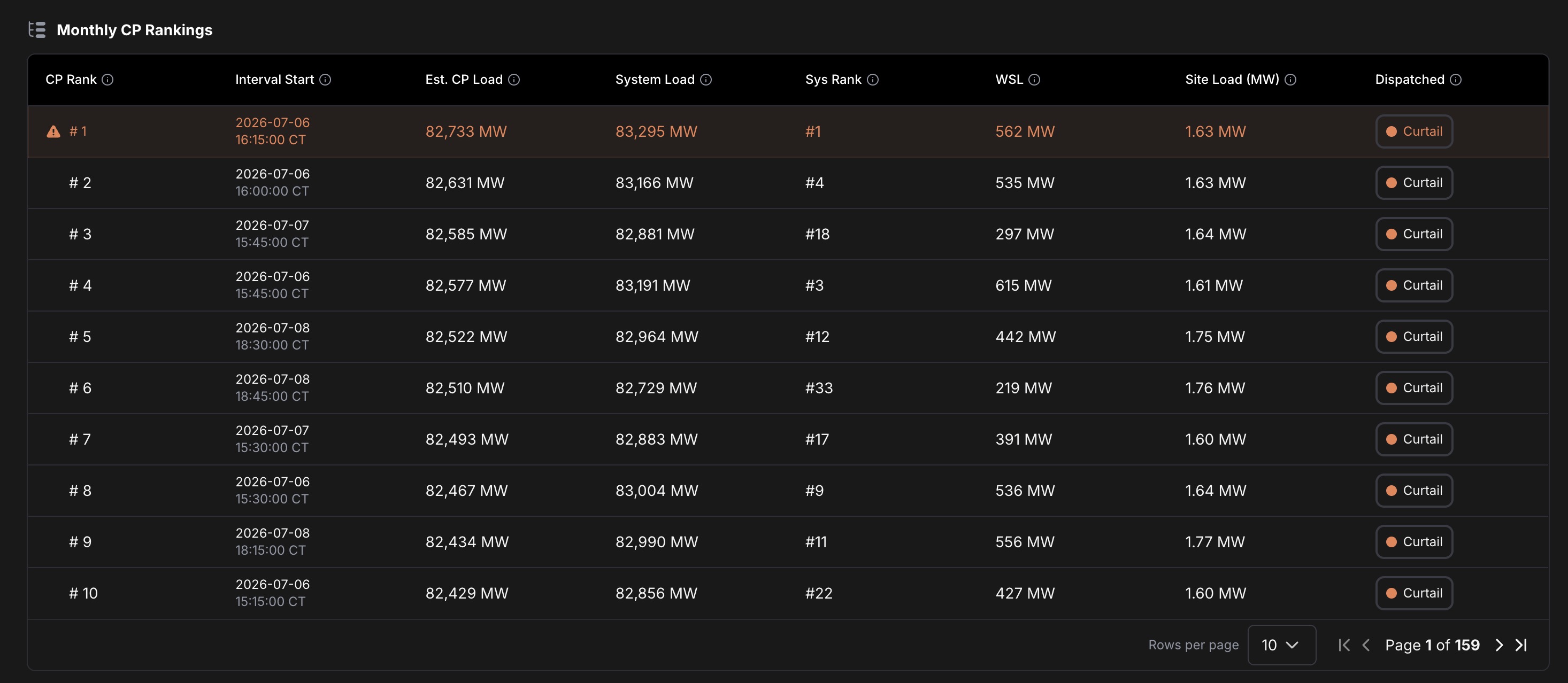
Monthly CP Rankings
Each month, ERCOT ranks every 15-minute interval by Estimated CP Load. The top few rows are the intervals most likely to become the peaks that set next year's transmission charges.
If you see your site still hashing during a top-ranked interval, you're taking peak risk the engine was trying to avoid—worth a conversation with ops.
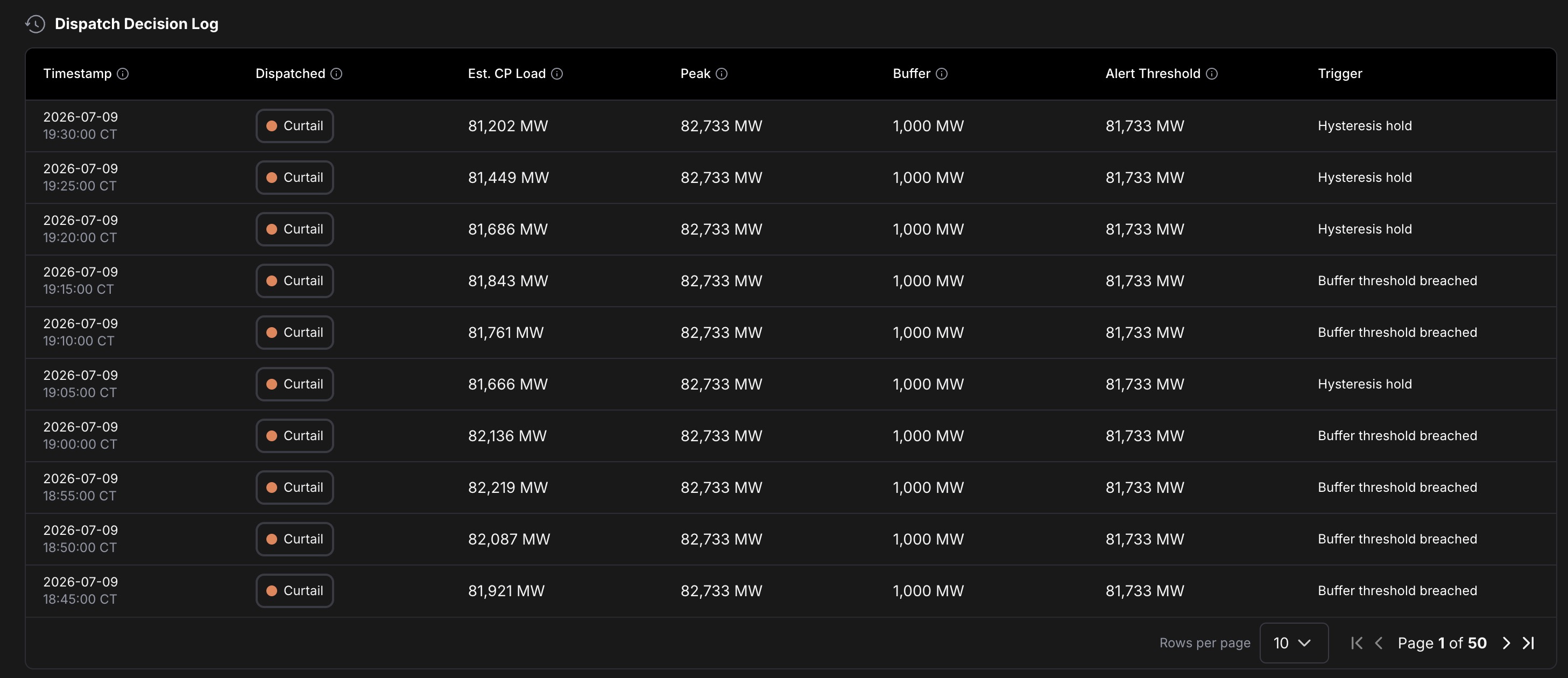
Dispatch Decision Log
Every signal the engine sent: when, whether it said Curtail or Sustain, and why (buffer threshold, system load override, etc.).
Use this after a hot afternoon to answer "why did we curtail at 4:15?" without digging through logs.
Settings that actually matter
Open Settings from the page header.
Turn it on
4CP Optimization Engine — Off means no monitoring and no signals. On means the engine runs for this site.
Aggressiveness
How early the engine pulls the trigger:
- Conservative (1,500 MW buffer) — Curtails sooner. More downtime, lowest chance of missing a peak.
- Normal (1,000 MW buffer) — Good starting point for most sites.
- Aggressive (500 MW buffer) — Waits longer. Less downtime, higher chance you eat a peak anyway.
The engine curtails when Estimated CP Load gets within your buffer of the current Month Peak. Smaller buffer = closer to the peak before it acts.
System Load Threshold (optional)
A hard ceiling on total ERCOT system load. If the grid crosses this number, the engine curtails regardless of aggressiveness. Useful as a backstop on extreme demand days. Leave blank if you only want buffer-based logic.
Picking the right setup
| If you… | Start with… |
|---|---|
| Can't afford to miss peaks (transmission is a big line item) | Conservative |
| Want a balance of uptime and protection | Normal |
| Have very flexible load and can tolerate peak risk | Aggressive |
| See curtailments but still hit ranked peaks | Move more conservative, or add a System Load Threshold |
Review Acc Downtime and the Dispatch Decision Log at the end of each peak month. If downtime was high but you still set peaks, tighten settings. If you barely curtailed and stayed off the rankings, you might loosen up next season.
A quick glossary
- 4CP — Four Coincident Peaks. ERCOT's method for allocating transmission costs; your share depends on how much you consumed during the grid's highest peaks.
- Estimated CP Load — ERCOT-wide load excluding battery charging. The input to 4CP rankings—not the same as raw system load.
- Month Peak — Highest Estimated CP Load recorded this calendar month so far. The bar a new interval has to clear to hurt you.
- CT — Central Time. All timestamps on this page use ERCOT's timezone.
Energy Dashboard
Your one-stop shop for monitoring mining and energy operations in real time. The Luxor Energy Dashboard centralizes all operational, financial, and contractual data into a single platform.
Billing
Understand how Luxor Energy calculates your electricity charges and breaks down costs by category across each billing cycle.