

Hashrate Routing
Aggregate your miners behind a site-level proxy to cut upstream bandwidth, improve share efficiency and split hashrate across pools with automatic failover
Commander Pro Required
Hashrate Routing is available exclusively on the Commander Pro plan. See Pricing for details.
Overview
Without a proxy, every miner on your site opens its own stratum connection to the mining pool. A site with 2,000 miners keeps 2,000 connections open over the internet, each one receiving its own job notifications and submitting its own shares.
Hashrate Routing puts a proxy (the Luxor Relay) on your Commander Agent, inside your site network. Miners point to the proxy instead of the pool, and the proxy keeps a small, fixed set of upstream connections to the pools on their behalf. To the pool, the whole site looks like one large miner.
Without a proxy: one pool connection per miner.
Miner 1 ──────────────┐
Miner 2 ──────────────┤
Miner 3 ──────────────┼──▶ Pool
  ...                 │
Miner N ──────────────┘
With Hashrate Routing: a few pool connections for the whole site.
Miner 1 ──┐
Miner 2 ──┤                   ┌── 80% ──▶ Pool A
Miner 3 ──┼──▶ Proxy ─────────┤
  ...     │   (on Agent)      └── 20% ──▶ Pool B
Miner N ──┘
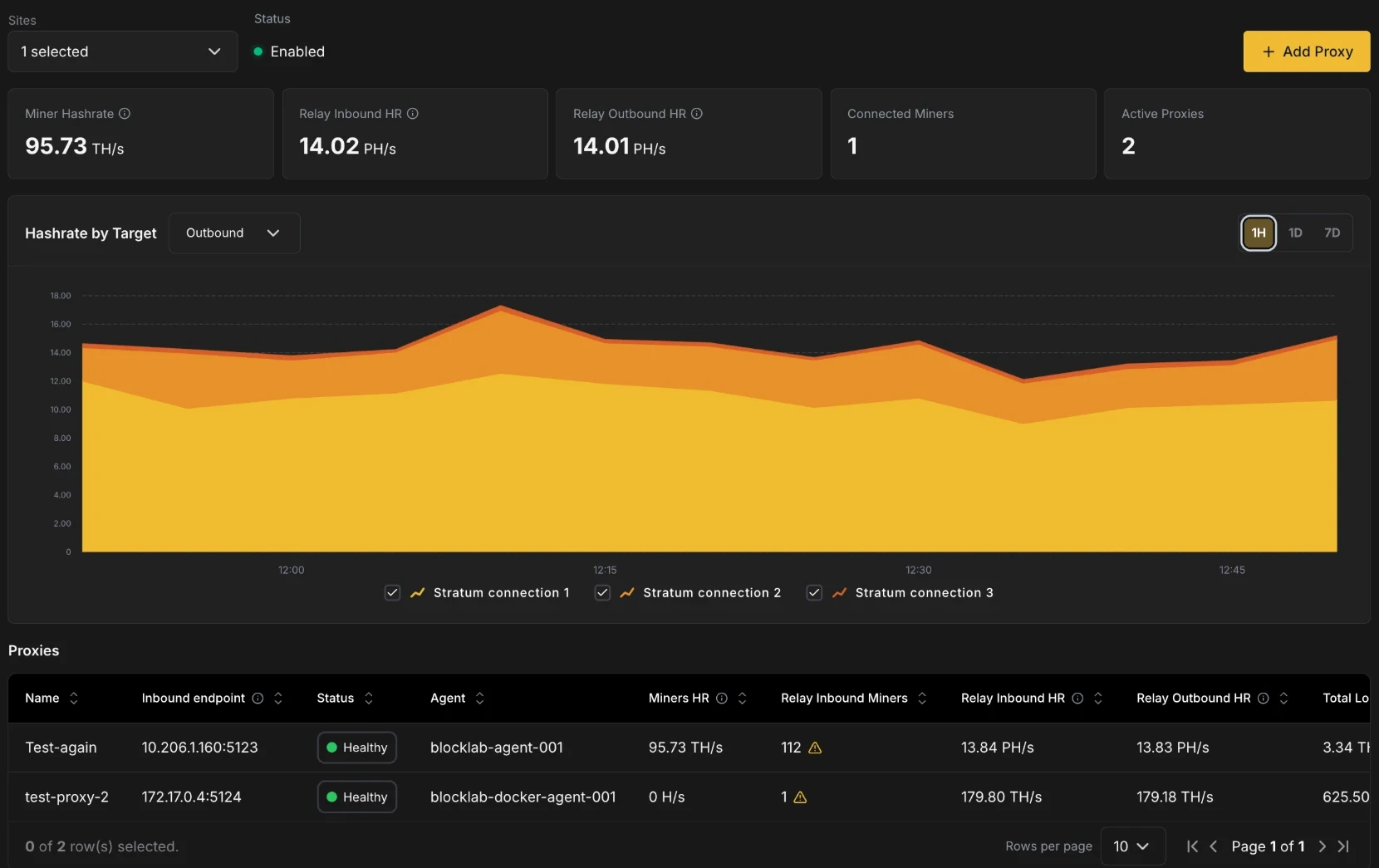
Hashrate Routing is accessible from the Routing tab in the Commander navigation.
Benefits
Lower upstream bandwidth
Every pool connection carries a steady stream of job notifications, difficulty updates and share submissions. With one connection per miner, that traffic grows with your fleet and all of it crosses your site's internet uplink.
With a proxy, the traffic between miners and the proxy stays on your local network. Only the proxy's upstream sessions (3 per stratum connection) reach the pool, and only shares that meet the pool's difficulty are forwarded. Upstream traffic depends on the number of stratum connections you configure, not on the number of miners. This matters most at sites with limited, metered or satellite/cellular connectivity.
Better share efficiency
A share the pool rejects is hashrate you paid for and didn't get credit for. Many rejects come from latency and job churn: a miner submits work for a job the pool has already replaced, or a long round trip makes an otherwise valid share arrive late.
The proxy sits next to your miners, so they get new jobs and share responses over the local network instead of the internet. It also:
- Validates each share locally before anything is sent upstream. Stale or malformed shares are answered right away and are not forwarded to the pool.
- Sets each miner's difficulty individually, targeting about one share every 10 seconds per miner, so every machine keeps a steady share cadence instead of inheriting a pool difficulty sized for the whole site.
- Forwards only shares that meet the pool's difficulty, over long-lived connections that are already authenticated.
You can track the result on the dashboard: Total Loss shows exactly how much submitted hashrate the pools did not accept.
Hashrate splitting with automatic failover
A single proxy can divide your site's miners across several stratum connections, for example 80% to one subaccount and 20% to another, or 50/50 between two pools. Each stratum connection has a primary pool and up to five ordered backups. If the primary goes down, the proxy moves that connection's miners to the next backup without you reconfiguring a single machine, and moves them back once the primary has recovered.
Changing the split later is a single edit in Commander. You don't need to repoint any miners.
Requirements
- Commander Pro plan.
- A Commander Agent running on Linux, version 1.32.0 or later. The proxy runs as a service alongside the Agent and is installed with it. Windows and macOS Agents are not supported; the Add Proxy dialog shows "Not available on this agent" if you select one.
- Miners that can reach the Agent's host IP on the proxy port, and that speak Stratum V1 (
stratum+tcp://). - The Edit Agents permission on the site to create, edit or restart proxies.
Setting up a proxy
Setting up Hashrate Routing has two steps: create the proxy, then point your miners to it.
1. Create the proxy
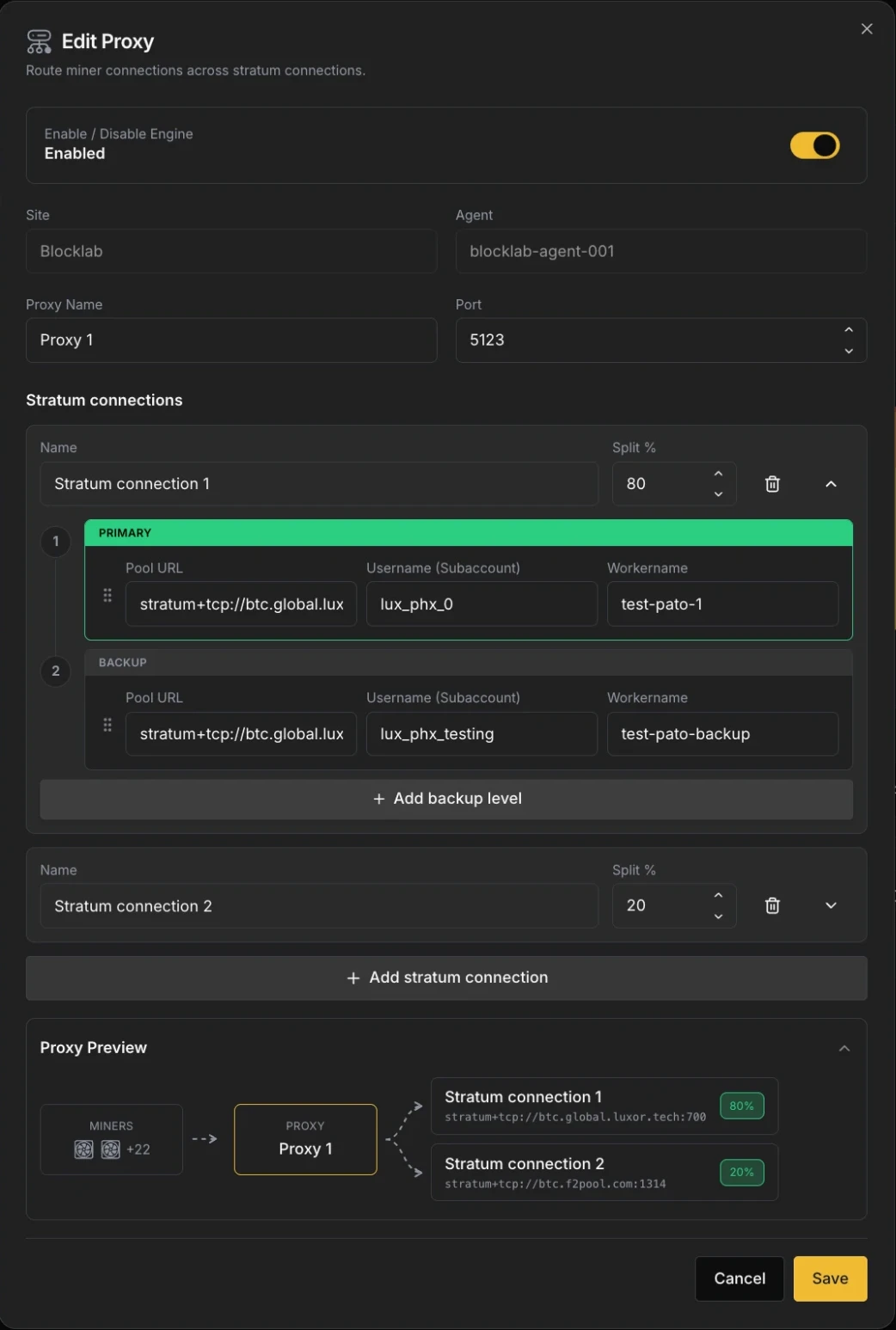
On the Routing page, select a site and click + Add Proxy. Then configure:
- Enable / Disable Engine: turns the proxy on or off. New proxies are enabled by default.
- Site and Agent: the Agent that will host the proxy. Only sites selected on the page are listed. These can't be changed after the proxy is created.
- Proxy Name: a label for the proxy, e.g.
phoenix-site-a. - Port: the port miners will connect to on the Agent's host (1–65535, default
3333). Make sure it is not already in use on that host and that your firewall allows miner traffic to it.
Stratum connections
A stratum connection is one destination for part of your hashrate. Every proxy needs at least one. For each stratum connection, set:
- Name: a unique label, shown in the dashboard chart and table (e.g.
Luxor main,Hosting client B). - Split %: the share of the proxy's miners routed to this connection. The splits of all connections must add up to 100%; the dialog shows how much is left to allocate (or over-allocated) and Save stays disabled until the total is exactly 100.
Each stratum connection holds an ordered list of pool levels. The first is the Primary; the rest are Backups, used in order. For each level, set:
| Field | Description |
|---|---|
| Pool URL | stratum+tcp://, stratum+ssl:// or stratum+tls://, with an explicit host and port. |
| Username (Subaccount) | The pool account (subaccount) that receives the hashrate. |
| Workername | The worker name the pool will show for this connection's aggregated hashrate (e.g. site-a-proxy). |
Click + Add backup level to add a backup (up to 5 backups, 6 levels in total), and use the drag handle to reorder levels. Dragging a level to the top makes it the new Primary. Click + Add stratum connection to add another destination.
The Proxy Preview at the bottom of the dialog shows the resulting route: your miners, the proxy, and each stratum connection with its primary pool URL and split.
Click Save. The proxy starts on the Agent and reports Starting until its first status report arrives, then Healthy once it has an authenticated session with a pool.
2. Point your miners to the proxy
Once the proxy is running, its Inbound endpoint (IP:port) appears in the Proxies table. Miners must use this address as their pool.
The easiest way is the Change Pool Settings bulk action:
- On the Miners page, select the miners you want to route. All of them must be managed by the same Agent as the proxy, and only one site can be selected.
- Choose Change Pool Settings. Your proxies appear in the Pool URL dropdown, marked with a routing icon and labelled
Proxy name (stratum+tcp://IP:port). - Select the proxy. Commander fills in the rest automatically: the username is locked to the subaccount of the proxy's largest connection, and the worker name to the miner's IP address. The proxy decides where each miner's hashrate actually goes, so these values only identify the miner to the proxy.
- Apply the action.
If the selection includes miners from a different Agent, Commander blocks the action, since those miners can't reach the proxy.
You can also configure miners manually (through their firmware UI or another tool) with Pool URL stratum+tcp://<Inbound endpoint>. The proxy accepts any username and worker name from the miner.
Pool-side worker names
The pool sees one worker per pool level, using the Username and Workername configured on the proxy. Individual miners no longer appear as separate workers in your pool dashboard. Use Commander's Miners page to monitor per-machine performance.
How routing works
Hashrate splitting
The split is applied by miner count, not by measured hashrate. When a miner connects, the proxy assigns it to the stratum connection that is furthest below its target percentage. With an 80/20 split and 100 miners, about 80 miners hash on the first connection and 20 on the second.
Every 30 minutes the proxy checks the distribution and rebalances if a connection has drifted from its target by more than 5% (or 2 miners, whichever is larger), moving miners between connections. If your fleet mixes very different models, the hashrate split can differ from the miner split.
A connection with a split of 0% stays connected to its pool but receives no miners. This is useful to keep a destination warm before shifting hashrate to it.
Failover and recovery
Each stratum connection fails over independently. The proxy switches a connection to its next backup level when the current pool:
- drops the connection or rejects the login, or
- stops sending new jobs for 120 seconds.
Miners are moved to the backup without being disconnected wherever possible, so they keep hashing through the switch.
While on a backup, the proxy checks the primary every 30 seconds. It switches back once the primary has been healthy for 5 minutes, which prevents flapping between pools.
If every level of a stratum connection is down, its miners are temporarily moved to another stratum connection (and credited to that connection's subaccount) until their own connection recovers. If the proxy can't place a miner anywhere within 60 seconds, it disconnects the miner so the miner's own firmware failover takes over.
Navigating the Routing page
Site selector and Status
Use the Sites selector to view one or several sites at once. Status shows Enabled when at least one proxy in the selection is healthy or degraded.
KPIs
| KPI | Description |
|---|---|
| Miner Hashrate | Hashrate reported by the miners' own firmware, summed across Commander-managed miners only. |
| Relay Inbound HR | Hashrate arriving at the proxies from connected miners, derived from all submitted shares (accepted, rejected and unanswered). |
| Relay Outbound HR | Hashrate the proxies successfully forwarded to pools, estimated from accepted shares. |
| Connected Miners | Miners connected to the proxies in the last 5 minutes. |
| Active Proxies | Number of enabled proxies. |
Relay Inbound HR and Relay Outbound HR are calculated from share data, so they include any device connected to the proxy, even if Commander doesn't manage it. Miner Hashrate comes from Commander-managed miners only, which is why the numbers can differ.
Hashrate by Target
A stacked chart with one series per stratum connection, so you can confirm your split is behaving as expected. Use the dropdown to switch between Outbound (accepted by pools, default) and Inbound (submitted by miners), and the 1H / 1D / 7D buttons to change the time range. Click a legend item to hide or show a connection. When several sites are selected, series are labelled Site · Connection.
Proxies table
| Column | Description |
|---|---|
| Name | Proxy name. |
| Site | Shown when more than one site is selected. |
| Inbound endpoint | The IP:port miners point their stratum connection to in order to route through this proxy. |
| Status | Proxy health (see below). |
| Agent | The Agent hosting the proxy. |
| Miners HR | Firmware-reported hashrate of Commander-managed miners connected to this proxy. |
| Relay Inbound Miners | Miners connected to the proxy. A warning icon means some of them are outside the Agent's configured network, so Commander can't match them to a known device. |
| Relay Inbound HR | Hashrate submitted to the proxy by miners. |
| Relay Outbound HR | Hashrate accepted by the pools. |
| Total Loss | Hashrate submitted to the proxy but not accepted by the pools (rejected and unanswered shares). Equals inbound minus outbound. |
| Routing Connection | The split percentage of each stratum connection. |
| Stratum URL | Primary pool URL of the first stratum connection. |
Proxy status
| Status | Meaning |
|---|---|
| Healthy | The proxy is reporting and has an authenticated session with a pool. |
| Degraded | The proxy is reporting but has no authenticated pool session. Check the pool URLs and credentials. |
| Starting | The proxy was enabled less than 5 minutes ago and hasn't reported yet. |
| Unhealthy | The proxy hasn't reported for more than 5 minutes after being enabled. |
| Unknown | The Agent hosting the proxy is offline. |
| Disabled | The proxy engine is turned off. |
Proxy actions
Each row has two actions:
- Edit Proxy: open the proxy configuration. Changes to stratum connections, splits and pool levels are applied without restarting the proxy.
- Restart proxy: restart the proxy process on the Agent. Miners routed through the proxy lose their connection while it restarts and reconnect on their own once it's back. Restart requires the Agent to be online and the proxy to be enabled.
To stop a proxy, edit it and turn off Enable / Disable Engine. Remember to point the affected miners back to a pool first, otherwise they will fall back to their own backup pools.
Troubleshooting
| Symptom | What to check |
|---|---|
| Proxy stays Degraded | The proxy can't authenticate with any pool level. Verify the Pool URL (scheme, host and port), Username and Workername, and that the Agent host has outbound internet access to the pool. |
| Proxy is Unknown | The Agent is offline. See Troubleshooting. |
| Connected Miners is 0 | Miners aren't reaching the proxy. Confirm their Pool URL is stratum+tcp://<Inbound endpoint> and that no firewall blocks the port on the Agent host. |
| Warning icon next to Relay Inbound Miners | Some connected miners are outside the Agent's configured network ranges. Add their range to the Agent's network configuration so Commander can identify them. |
| High Total Loss | Check pool health and the Agent host's internet connection. Persistent rejects from a single pool may indicate wrong credentials or an overloaded pool endpoint. |
| Hashrate split differs from the Split % | The split is by miner count. Fleets mixing old and new models will show a different hashrate ratio. |
| Can't save the proxy | Splits must total 100%, every pool level needs a URL, Username and Workername, and the Agent must run on Linux. |